Everything you need to know about Windows 11
Microsoft made its newest operating system, Windows 11, publicly available on October 5, 2021 — a little over six years after Windows 10 debuted. Windows 11 offers several updates and new features, including a simpler design intended to increase productivity, ease of use and creativity, ways to connect to people faster, better PC gaming experiences, faster ways to get information you need, an all-new Microsoft Store, and a more open ecosystem that unlocks new opportunities for developers and other creators.
This Microsoft Windows 11 cheat sheet details the operating system’s main features, lists system requirements for the OS, explains how and when to get it and more. We’ll update this Windows 11 guide when new information is released.
What is Windows 11?
Windows 11 is Microsoft’s newest major release of its operating system and the successor to Windows 10. The OS features an all-new simplified, yet modernized, interface and was designed to inspire productivity and creativity.
Windows 11 released
As of October 5, 2021, Microsoft Windows 11 is available as a general release to the public. Assuming your personal computer meets the prerequisite requirements including installation of Windows 10 1909 or later, you can upgrade to Windows 11 by navigating to the Update & Security settings screen.
Users may also take advantage of the Windows 11 Installation Assistant to bypass the Windows 10 Update & Security screen and upgrade to Windows 11 directly.
While the March 2022 Windows 11 Patch is not classified as a “feature update” to the operating system by Microsoft (a full feature update is scheduled for late 2022), the patch does contain a few unannounced new features. For example, if you run Windows 11 with Widgets turned on, you will notice a new icon in the lower left corner of the desktop that provides a summary of your local weather conditions. Microsoft has also updated Notepad and rebranded the Groove media player.
In September 2020, Microsoft began rolling out a new Windows 11 update to eligible computers. Known as Windows 11 22H2, this first major update added new features, applications and security protocols to the operating system, including hypervisor-protected code integrity security, sync status of OneDrive displayed in File Explorer, Windows Studio Effects, and streamlining changes for future Windows 11 updates and patches.
Pre-release updates of Windows 11
As of July 29, 2021, a preview version of Windows 11 was available for review to members of the Windows Insider Beta Channel; before that date, preview versions of Windows 11 were only available to members of the Dev Channel. So, to install Windows 11 Version 22000.100 or better on a valid Windows 10 PC, activate the Windows Insider Beta Channel on the Update & Security Settings screen in Windows 10 and then click the Check For Updates button.
As of August 23, 2021, Microsoft has released an ISO file for the Windows 11 Insiders Preview; previously, your only option was to upgrade Windows 10 to Windows 11 through Microsoft’s Windows Insider program. To download the Windows 11 ISO file, navigate to the Windows Insider Preview Downloads page and sign in with your account.
What is the Windows 11 version timeline?
Version 21H2
The original version of Windows 11 was released to the public in October 2021. This version, also referred to as version 21H2 and codenamed “Sun Valley,” was made available as a preview build to Windows Insiders in the development channel in June 2021. During its approximately one year of existence, Windows 11 version 21H2 was updated and patched over two dozen times.
Version 22H2
The Windows 11 2022 Update, often referred to as 22H2 and codenamed “Sun Valley 2,” was the first major update to Windows 11. The first preview of version of Windows 11 22H2 was released to Windows Insiders in the Dev Channel on September 2, 2021. The update began rolling out to the public on September 20, 2022.
The Windows 11 2022 Update included several feature updates, improvements and enhancements. Since its release, Windows 11 22H2 has been patched and updated numerous times. The Windows 11 2022 Update is the most current version of the Microsoft operating system.
What new features come with Windows 11?
In Windows 11, the newly centered Start button uses the cloud and to show recent files, no matter what platform or device they were being viewed on previously, including an Android or iOS device.
A new set of features to Microsoft Windows 11 will be the introduction of Snap Layouts, Snap Groups and Desktops. These offer a “powerful way to multitask and stay on top of what you need to get done,” according to the Microsoft’s press release. With these Windows 11 features, users can organize windows and optimize screen real estate for a cleaner visual layout. Users can create and customize separate Desktops for each part of their life—like one for work and one for personal use.
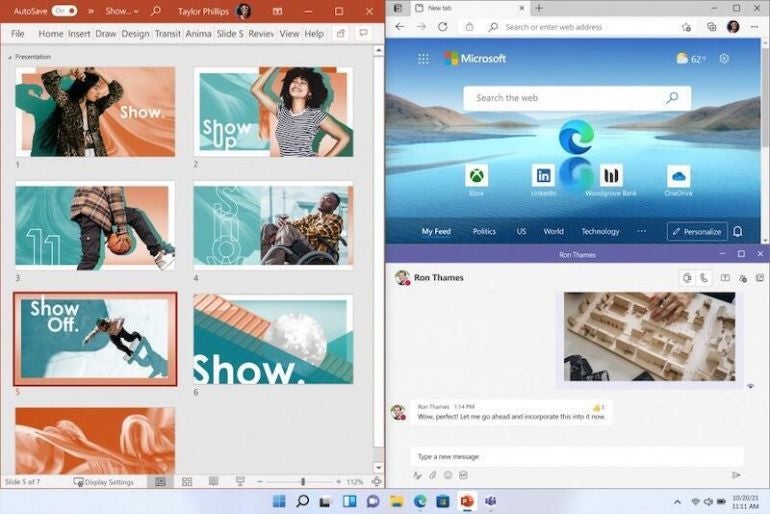
Windows 11 desktop features
In Windows 11, Microsoft is integrating Chat from Microsoft Teams into the taskbar so users can instantly connect via text, chat, voice or video with personal contacts regardless of which platform or device is being used across Microsoft Windows, Android or iOS. Through Microsoft Teams, users can now instantly mute and unmute or start a presentation directly from the taskbar in the new OS.
For gamers, Windows 11 “unlocks the full potential of your system’s hardware, putting some of the latest gaming technology to work for you,” according to Microsoft. Windows 11 will offer DirectX 12 Ultimate, which enables immersive graphics at high frame rates; DirectStorage for faster load times and more detailed game worlds; and Auto HDR for a wider, more vivid range of colors. Microsoft Windows 11 will still support users’ favorite PC gaming accessories and peripherals.
Windows 11’s new Widgets are a personalized feed powered by artificial intelligence and Microsoft Edge. Instead of using a phone to check news, weather or notifications, now users can open their Windows 11 desktop to see a similarly curated view. Widgets offers new opportunities within Windows 11 to deliver personalized content for creators and publishers.
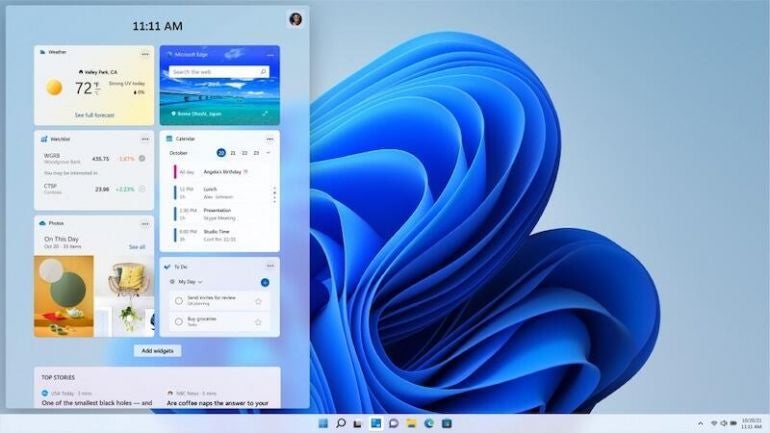
The widgets are a new feature in Windows 11, after many years of Linux
The Microsoft Store is getting a major overhaul–users will have one safe location for apps and content to watch, create, play, work and learn. According to Microsoft, the Store “has been rebuilt for speed and with an all-new design that is beautiful and simple to use. Not only will we bring you more apps than ever before, we’re also making all content—apps, games, shows, movies—easier to search for and discover with curated stories and collections.” Soon, leading first- and third-party apps such as Microsoft Teams, Visual Studio, Disney+, Adobe Creative Cloud, Zoom and Canva will be available in the Microsoft Store.
Coming in late 2021 for Windows 11: Android apps on Windows. Through its partnership with Amazon and Intel, and for the first time ever, the Microsoft Store will allow users to discover Android apps, which can be downloaded via the Amazon Appstore. Microsoft is enabling developers and independent software vendors to bring apps to the Microsoft Store, no matter what app framework is used to create them.
What new features come with Windows 11 22H2?
The first major content patch known as Windows 11 22H2 added several new features and applications to the operating system.
For enterprise users, Windows 11 22H2 improved File Explore functionality to integrate OneDrive status, which improves team collaboration and cooperation. The update also added a new feature called Windows Studio Effects which will improve virtual meetings with AI-powered processing efficiency.
At the user level, Windows 11 22H2 added new quality-of-life features like voice activated navigation, Start Menu feature improvements, additional personalization themes and the Clipchamp app. Windows 11 22H2 also added new live captioning features for automatically transcribing virtual meetings.
What do developers need to know about Windows 11?
Windows 11 features the new PWABuilder3, so developers can build a PWA from their web app in minutes. WebView2 runtime is included with Windows 11, which makes it easier to take advantage of its web platform as a secure way to build hybrid web apps. Offerings like Windows Terminal and the new Microsoft Edge DevTools can still be used, as they are now included in Windows 11.
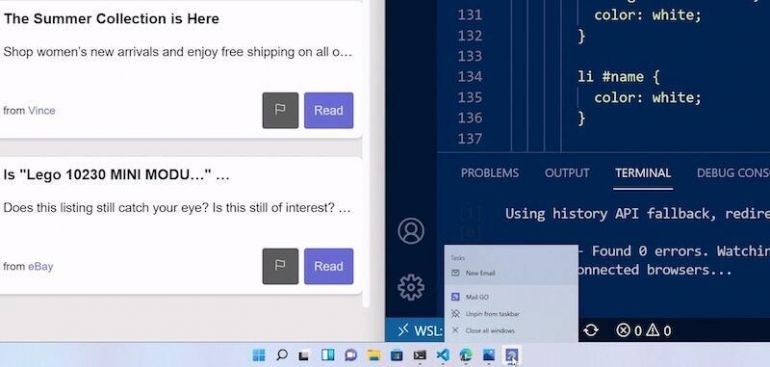
PWA Shortcuts integrated with Windows 11.
The Windows App SDK (previously known as Project Reunion) will make it easier to integrate Windows 11 features into apps, but it still allows developers to reach more than a billion users on Windows 10. The Windows App SDK 1.0 is set to be released later this year.
Developers can build apps that run natively on Windows on ARM with the new ARM64 Emulation Compatible ABI. Using the ARM64EC, native ARM and emulated x64 code can be mixed in the same process or module. This interoperability means developers can optimize apps to run on Windows on ARM—even if the app has x64 dependencies or loads x64 plugins they don’t control.
To rejuvenate app designs, developers can use WinUI3 in Windows 11, which offers built-in UI updates such as rounded geometry, refreshed iconography, new typography, fun micro-interactions (such as Lottie animation) and refreshed color palette. The Snap layouts feature will helps with maximum productivity in Windows 11.
Reunion Windowing allows developers to easily manage and create app windows. The feature works with existing app codes, simplifies common operations and brings new functionality to desktop apps like Light-Dismiss Behavior, Picture-In-Picture mode and easier titlebar customization.
Along with the major changes to the Microsoft Store, Microsoft is taking steps to unlock greater economic opportunity for creators and developers. Microsoft plans to enable developers and independent software vendors to bring their apps regardless of whether they’re built as a Win32, Progressive Web App, Universal Windows App or any other app framework. This will allow developers to reach and engage a larger audience.
The revenue share policies will be changing, too, according to Microsoft. App developers can now bring their own commerce into the Microsoft Store and keep 100% of the revenue—Microsoft takes nothing. Developers can still use Microsoft’s commerce with competitive revenue share of 85/15.


